Introducing Control4 X4: The Smarter, More Flexible Home Experience
In the world of smart home automation, innovation is driven not just by new devices but by better usability, deeper integration, and empowering homeowners to take control. With Control4’s new X4 platform, we’re seeing exactly that — a leap forward from a traditional operating system into a full smart-living platform.
X4 doesn’t merely refresh the interface; it rethinks how homeowners interact with their automation system day to day. Among its standout additions are a modernized Home Screen, user-editable Routines, Widgets, and—critically—enhanced integration with Apple HomeKit. Snap One Help+2CEPRO+2
In this post, I’ll walk you through:
- What’s new in X4
- How Apple HomeKit integration works
- What this means for end users—especially in terms of flexibility and custom routines
- Considerations / best practices for rollout and upgrade

What’s New in X4
While X4 is a natural evolution from Control4 OS 3, it introduces real shifts not just cosmetically but functionally. Here are some of the most compelling new features:
- Home Screen / Dashboard
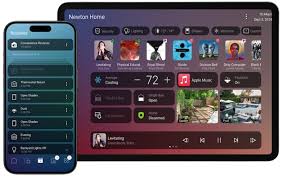
X4 introduces a redesigned home screen that acts as a unified control hub, giving high-level visibility over devices, scenes, cameras, and system status. Snap One+2CEPRO+2 - Widgets & Personalization
Users can add, resize, and reposition widgets on their home screen—camera previews, lighting scenes, thermostat status, etc. These widgets let them shape the interface to their usage. Snap One+2Snap One Help+2 - Routines (User-Editable Automations)
Perhaps the biggest shift: with X4, homeowners can create, edit, schedule, or trigger Routines (i.e. sequences of actions) directly from the user app, without needing to loop back to the installer for every little tweak. This gives flexibility to adapt as habits evolve. CEPRO+2Snap One Help+2 - Improved Connectivity & Ecosystem Support
X4 brings enhanced Apple integration (HomeKit, Siri, CarPlay, etc.), and supports expanded flexibility to work with both Control4’s native control ecosystem and third-party devices more fluidly. Scento+4CEPRO+4Snap One Help+4 - Self-Sufficiency & Post-Installation Tweaks
The goal behind X4 is to reduce reliance on integrators for small changes. Small edits to automation, schedules, or scenes can now be handled by the homeowner directly. CEPRO+1
In short: the system becomes more dynamic, more interactive, and more responsive to how people live—not just how they originally set it up.
Apple HomeKit Integration: What’s New & How It Works
One of the most talked-about capabilities in X4 is its enhanced integration with Apple HomeKit, which bridges your Control4 system more tightly into the Apple ecosystem.
What “enhanced integration” means:
- Scene / Device Control via Home App / Siri
Devices and scenes managed by Control4 can be exposed to the iOS Home app (and macOS where applicable). Home users can trigger Control4 scenes or control individual devices via the Home app or via voice through Siri. Snap One Help+3CEPRO+3Snap One+3 - Unified Ecosystem Behavior
Rather than treating HomeKit and Control4 as separate “worlds,” X4 lets them cooperate. So a HomeKit-enabled light or sensor and a Control4-native lighting module can be combined in the same automation logic. Snap One+2CEPRO+2 - Trigger from CarPlay / iOS / Mac
Now users may trigger Control4 routines or scenes from CarPlay, iPhone, or Mac, making it more seamless to integrate automations with mobile habits. Snap One+1 - Device-level Control
Individual Control4 devices—dimmers, switches, etc.—can be controlled via HomeKit interfaces, not just through scenes. CEPRO+1 - Better Cross-Platform Integration
For households already invested in the Apple ecosystem, this integration reduces friction: users don’t need to double-manage scenes or workarounds to coordinate between Control4 and HomeKit devices. Snap One Help+3Audio Concept+3CEPRO+3
In effect, X4 makes Control4 a “first-class citizen” in a HomeKit-enabled home, rather than a parallel world.
What This Means for Your Customers: Flexibility, Empowerment, and Adaptability
From the user’s perspective, these changes unlock new freedom and responsiveness in how their smart homes behave. Below are the key benefits:
1. Self-service tweaks & refinements
Previously, if someone wanted to adjust the timing of “Good Morning” or change which lights come on with “Movie Night,” they’d need to contact the integrator. With Routines in X4, they can make those changes themselves—no waiting, no extra fees. This empowers users and reduces service calls.
2. Evolving routines & behavior alignment
Our lives evolve: kids get older, schedules shift, new devices get added. With X4, routines can adapt. The user isn’t locked into the original programming; they can evolve their home’s automation logic as life changes.
3. Unified control across ecosystems
For customers who already use HomeKit (or plan to), X4’s integration means fewer “interop headaches.” Whether triggering a Control4 scene or a native HomeKit accessory, it happens in the same environment.
4. Better user experience & adoption
An intuitive, customizable home screen with widgets reduces friction. People are more likely to use automation if interacting with it is easy, fast, and tailored to their habits.
5. Less dependence on integrator for minor tweaks
Of course, for major changes or expansions, integrators are still essential. But by handing over control of everyday fine-tuning, integrators free up time for higher-value work, and customers feel more ownership.
6. Opportunity for incremental upsells
As users grow comfortable with routines, they may want to expand them—add sensors, logics, third-party integrations. X4 paves the way for deeper personalization, which can be a sales opportunity down the line.
Deployment & Upgrade Considerations (What to Watch Out For)
Before you roll X4 out to all customers, here are some caveats and considerations:
- Hardware / Controller Compatibility
Not all legacy hardware may support every new X4 feature. Some older lighting devices (Gen 1/2) may be deprecated or unsupported in newer versions. Snap One Help+1 - Software / Licensing Requirements
Upgrades to X4 will require a Connect license, and the system must be running certain baseline OS versions (e.g. OS 3.4.2 or higher) before converting. Snap One Help+1 - Training for Users
Giving customers new power is good—but they’ll need intuitive onboarding (videos, quick guides) so they don’t accidentally break important routines. - Guardrails & Safety Fallbacks
For mission-critical systems (security, door locks, safety scenes), you might want to restrict or protect certain automations from accidental user edits. - Testing Interoperability
In mixed-device homes (some native HomeKit, some Control4, some custom drivers), test edge cases carefully to ensure scenes/triggers behave consistently. - Incremental Rollout Strategy
It may make sense to pilot X4 with a subset of your customer base first—power users or tech-savvy clients—to work out edge cases before mass rollout.
Sample Use Cases & Scenarios
Here are a few illustrative routines and flows that X4 + HomeKit integration enables:
- “Good Morning” Routine
At 6:45 am, raise blinds, ramp up bedroom lighting, start your preferred news station, raise thermostat—and if motion detected in the hallway, also turn on pathway lights. The user can adjust any of these steps anytime. - Away / Vacation Routine
Triggered by a HomeKit-enabled departure sensor (or via CarPlay), shut off lights, arm security, adjust climate, and simulate occupancy via lights in random rooms. - “Movie Night” Scene
Dim main lights, lower shades, power on A/V system, set sub-zone lights to “soft backlight.” User can later add alternate behavior (e.g. turn on popcorn room light) without calling the installer. - Contextual Trigger via HomeKit Accessory
If a HomeKit motion sensor in a hallway detects movement after 10 pm, trigger Control4 pathway lights, or invoke a nighttime mode scene.
These reflect just a few ways X4 and HomeKit working together simplify smart home logic and make it more responsive to real life.
Conclusion
Control4 X4 is more than just an operating system update—it’s a platform shift. Its tighter Apple HomeKit integration, combined with homeowner-editable Routines and a more responsive user interface, make the entire system more adaptable, more user-driven, and more resilient to change over time.
By giving customers the power to tweak and tinker—while preserving the integrity and reliability of the core system—you strike a balance between customization and control. For homeowners, this means a smarter, more responsive home that aligns with their evolving lifestyle. For integrators, it means fewer routine support calls, deeper customer engagement, and opportunities to guide clients toward more advanced automation as needs grow.